Categories
Blog posts

Training draft_bot, Part 1: Background

This post is part of a series I’m writing about my efforts to create a Magic: the Gathering draft bot. The series will be grouped under the “draft_bot” tag.

Summary: In this post I’ll go into some of the basic concepts of MtG and drafting, which are prerequisites for the following posts. You can probably skip this one if you’re already familiar with Magic.

Introduction to MtG Drafts

Magic: the Gathering

Magic: the Gathering is the oldest trading card game in existence; in my opinion, it’s also the best game ever made. Throughout the course of a game, players build up resources and use those resources to cast spells and creatures (minions that can attack your opponent or defend against them). I won’t go into all the rules here, as the game is notoriously complex; check out the official intro page if you are interested.

For now, you just need to know that in order to play a game of Magic, you need a deck of cards to draw from. This presents a problem for new players – if you’re new, you don’t own any cards. Where to start?

Limited Formats and Drafting

Magic elegantly solves this problem with the concept of limited formats. These are game formats that don’t require players to come ready with a deck: instead, they start with a subgame in which players build their decks using randomized sets of cards, or “packs”. (These packs are sold as sealed product by Wizards of the Coast, the company that owns the game.)

Draft is one of these limited formats. There are many possible types of draft, but the most common one works as follows: A group of 8 players sit in a circle – each one opens a pack of 15 randomized cards. After taking a card, each player passes the remaining cards in their pack to the player next to them. Each player repeats that process as the packs are passed around until no cards are left. This whole process happens 3 times (each player opens 3 fresh packs and passes them around the table). By the end of the draft, the players have enough cards to build a deck and start playing. See the official description by Wizards of the Coast here.

Draft Formats

New MtG cards are usually released as part of a larger “set” of cards that are meant to be drafted together. Players will often refer to a group of cards meant to be drafted together as a “draft format”. Game designers at WotC create these draft formats with the intention of creating a fun environment where players can draft a diverse set of possible decks that interact in interesting ways.

Draft Strategy

For each player, the draft subgame consists of about 40 “pick” decisions: given the pool of cards I already have and the cards I have already seen in the draft, which of the cards should I take out of the pack in front of me?

Consistently drafting well is quite difficult; there’s a surprising amount of complexity behind this subgame.

Card strength

This is probably the simplest factor to evaluate when making a draft pick. Some cards are simply more powerful than others – that’s the way the game was designed. Players are (naturally) trying to pick the most powerful cards available to them. It’s common for players to take the one “rare” card in the pack as their first pick, since rares are often much stronger than the average card.

Community members will often release draft guides for each draft format with their power rankings of all the cards available in the format (for example, this DraftSim tier list for BRO).

Synergy with pool

For each draft pick, players must consider how well the pick synergizes with the cards that they’ve already picked (their “pool”). This is probably the most important factor for the majority of picks – there are several related sub-factors that determine a card’s synergy.

Colors

Again, I’m trying not to go too deep into the MtG rules here, but it’s nearly impossible to talk about drafting without touching on the concept of color. Mana is the most important resource in the game – it’s how you pay for playing your spells and creatures. Mana comes in 5 colors (or colorless); individual cards will tell you how much of each color of mana you need to pay to cast that card (check out the intro page for some examples).

Color is an important tool for the game designers to restrict and differentiate the types of MtG decks that are possible. It’s difficult to play lots of cards with different color requirements in the same deck, since cards that produce multiple colors of mana are rare or have various downsides (they will make your deck slower and less consistent). This means that you can’t just jam all the best cards together into a deck – you have to take their color requirements into consideration and make sure that you’ll actually be able to cast your spells.

This matters a lot when drafting. Players should usually pick cards in similar colors to cards they have already picked. The more cards one already has in a particular color, the stronger the “pull” to pick more cards of that color. By the third pack, players will often pass up on strong cards if the color requirements don’t match up with their pool.

Archetypes

Draft formats are often designed around specific deck archetypes: for example, there might be an aggressive, creature-focused red-white deck archetype in addition to a slower, artifact-themed blue-white archetype. Savvy players will be drafting towards one of these archetypes, and will make picks based on what archetype their pool is trending towards. While archetypes are often associated with certain colors, note that they are not the same as those colors – in the case of the red-white and blue-white archetypes example I just mentioned, there might be white cards that are strong in one deck but not the other.

Deck structure considerations

Successful draft decks usually have a particular structure – a rough number of cards of each mana cost, a rough number of creatures, a rough number of removal or interactive spells (this post goes into more details near the bottom). Savvy players will be drafting towards this ideal deck structure, and will make picks based on what their pool is missing. For example, if their pool already contains 16 creatures but has no removal spells, they might prioritize taking a strong removal spell above all else; if their deck is short on cheap creatures, they might prioritize that instead.

Reading the draft

Staying open

A common draft failure mode, especially among beginners, is committing too strongly after the first few picks of the draft. Early in the draft, there’s a lot of value in flexibility. Drafters who “stay open” to new colors or archetypes often end up with better decks; this is because they end up in a better position to pick up strong cards that get passed to them later on the draft.

Making flexible early picks can mean a bunch of different things:

  • Picking cards that are generically powerful in multiple types of decks, rather than requiring a certain archetype
  • Picking cards with less restrictive color requirements
  • Picking strong cards even if the pool doesn’t have any cards in that color yet

Of course, the longer the draft goes on, the less valuable flexibility becomes. There is less upside in speculating on future picks (since there are fewer picks left), and there is a higher risk of “wasting” your earlier picks and ending up with a nonfunctional deck. Determining exactly when to commit during a draft is a subtle skill that takes a lot of experience to master.

The open lane

A skillful drafter will be able to determine the “open lane” at the table based on information gleaned from passed cards. The open lane is the archetype that is underdrafted, meaning that other players are mostly not picking from that archetype. In the open lane, strong cards from that archetype will basically fall into the drafter’s lap – there’s little to no competition for them!

There are several methods for trying to find the open lane:

  • Noticing “wheels.” A card wheels when it goes around the whole table back to you without getting picked. If it was a strong card, that could indicate that other players are not picking from that card’s color / archetype.
  • Counting colors. The more quality blue cards you see coming your way, the more likely blue is to be open.
  • Signposts. There are certain cards that pull very strongly into certain archetypes; these are sometimes referred to as archetype signposts. If the players to your right just passed you one of those, you can infer that they’re probably not in that archetype.

Again, this is a subtle art. Skilled drafters will be able to adapt to signals in real time and are usually rewarded for it.

Motivations

While not as complex as MtG itself, the draft subgame is quite difficult to play optimally. There are a lot of pieces of information that need to be considered at once, and players need to be ready to make subtle tradeoffs across multiple axes.

I decided to focus on training an ML model to draft because it’s an easy task to represent abstractly, but humans tend to find it quite difficult. I personally would like to improve my drafting, and I’m hoping that in the process of training this model and applying it to my own drafts I’ll become a better player!

Categories
Blog posts

Debugging Mindset

You’ve run into a bug.

Your process crashes on a seemingly benign input, even though the unit tests are passing. Your API is returning garbage, but only after the server has been up for an hour. The compiler itself crashes when trying to build your latest code change (“what? how is that even possible??” you mutter to yourself).

What next?

This post will lay out some general advice for approaching bugs. Fostering the right debugging mindset can often be more helpful than any specific technical knowledge.

As with most general advice, the rules presented below won’t always apply. There will be exceptions. Think of them as heuristics, not commandments. With enough practical application, these principles will become habits of thought that can be selectively applied as your bug requires.

0: Don’t panic.

This is first for a reason. Nothing destroys a debugging strategy like panic.

Signs that you are in panic mode:

  • You are grasping at straws. You’re trying things at random, desperately hoping something will work.
  • You’re running something over and over to see if the problem has magically fixed itself.
  • You keep telling yourself that the problem is impossible (“this should never happen!”), as if the computer cares what you think is impossible.

You must convince yourself of the following:

  • This can be done.
    • The system you are working on was designed and implemented by humans. It can be understood and fixed by humans with careful study.
  • Your self-worth has nothing to do with this bug.
    • Having a bug in your program does not mean you are bad at programming. All programmers write bugs. This is a chance to learn and grow; don’t be too hard on yourself.
  • You have time to do this.
    • Unless you’re trying to fix a production system that is bleeding millions of dollars a minute, this is probably less urgent than you think it is. Your PM can survive waiting a few hours for a fix. Probably even a few days.
  • Once you understand the problem, it will feel less huge.
    • No matter how impossible this seems right now, the problem will almost certainly be simple enough to summarize in a few sentences when you’re done. Go back and remind yourself of previous bugs you have fixed if it helps convince you.

1: You need a mental model.

Without basic understanding, you are doomed.

This step can be safely skipped if you feel you already have an understanding of the system you’re working on, and the bug is contradicting that understanding (see 2a, You are wrong).

You need some idea of how your system works before you can effectively debug it. I’m talking about broad strokes here – fundamental information about the domain that can be acquired quickly. (“What is version control?”, not “how does the git branching implementation actually work?”)

Some suggestions for quickly establishing a mental model (these may or may not apply):

  1. Read the documentation, if it exists. Google what terms mean if you don’t understand them.
  2. Contact a subject matter expert (perhaps someone on your team) and get an explanation.
  3. Skim the code to see what it’s doing.
  4. Take note of the large, important subsystems at play. Consider drawing them out in a simple block diagram with inputs and outputs.

That’s it. For a surprising number of bugs, the solution will be found during this first step. If not, it’s time to refine and verify your mental model.

2: You need more data.

You will reach the truth by collecting data.

2a: You are wrong.

You are currently wrong about something. If you were right about all the factors at play, the bug would not be present – it follows that you are wrong. This may be hard to accept, but it’s true.

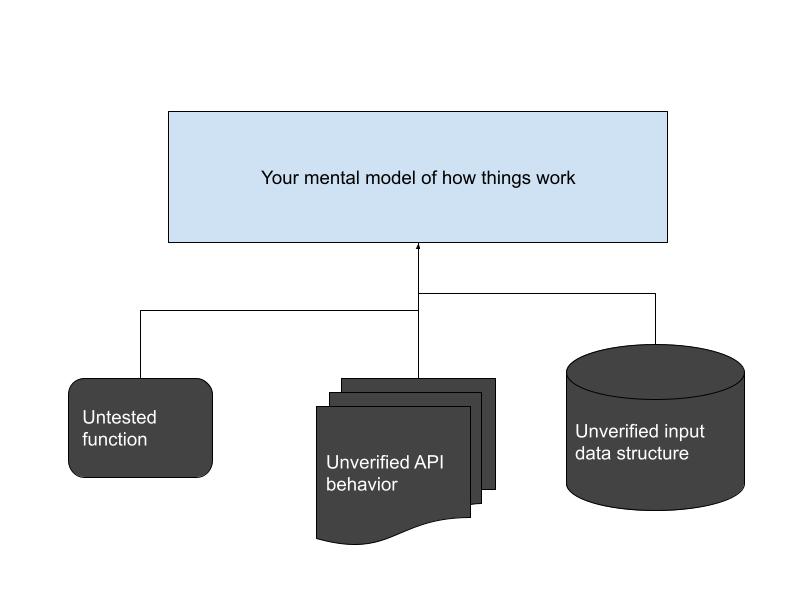
You are dealing with a complex system; your mental model of the system includes a set of  “black boxes” and abstractions, and there are parts of it that you may not understand at all. Let’s call all of these, collectively, your assumptions. An assumption is any statement about the system that you have not directly verified – anything from “This function called Average always returns the average of its inputs” to “This API call returns or errors out with a 5 second timeout”. 

The source of your problem is one of these. (The Average function actually fails when some of the inputs are negative. The API has an edge case where it takes 30 seconds to reply. Et cetera.)

Note that an assumption can be about ANY part of the system you have not directly verified – that may include code you have written! Trust nothing without evidence.

2b: Data checks assumptions.

While you are in the early stages of debugging, think of yourself as a detective, not an engineer. There is no specification for your problem, and it isn’t well-defined. You’re in the dark, and your goal is to illuminate that darkness, piece by piece. Each scrap of evidence you gather will either verify or refute some assumption supporting your mental model of the system.

The nature of the data you must collect is entirely dependent on the nature of the bug and which assumptions you are trying to verify. Some examples of data points and the accompanying assumptions they might verify / refute:

  • The unit test for behavior X passes.
    • This verifies that the code under test has behavior X.
  • The logs from the server that crashed include line Y.
    • This verifies that the binary running on the server executes the function containing log line Y.
  • CPU profile of process Z shows max usage of 52% of one core.
    • This refutes your assumption that process Z is automatically resource-limited to only 25% of one core.

Prefer evidence that is concrete and targets something specific. Trying a random solution and seeing if it works is a type of data gathering, but it doesn’t get you much closer to the true solution. Before you investigate, ask yourself how exactly this piece of data is going to improve your understanding of the system.

3: Make your problem smaller.

Seek data that simplifies the problem.

3a: Smaller problems are easier.

This is almost tautological. If given the choice of debugging 5000 lines of code or 50 lines, any reasonable person would choose the latter.

Furthermore, in software systems debugging difficulty does not tend to scale linearly with problem size. It’s usually much worse than that – each new subsystem that you have to consider might introduce N possible interactions with the existing N pieces. Reducing size can often turn a near-impossible problem to a trivial one.

In an ideal world, you will be able to isolate your bug to some minimal subset of the system under test (maybe even one line of bad code!).

3b: Use data to eliminate possibilities.

So, you need data, but not just any data. The most valuable data points are those that not only improve your understanding of the system, but also eliminate parts of the problem from consideration.

This is best illustrated by example. Let’s revisit the imaginary data points from 2b:

  • The unit test for behavior X passes.
    • This verifies that the class responsible for X is working as expected, eliminating the possibility that it contains the bug.
  • The logs from the server that crashed include line Y.
    • Since log line Y only appears when the server has successfully received a valid input from the client, you can eliminate the client-side code from consideration and focus on the server side.
  • CPU profile of process Z shows max usage of 52% of one core.
    • Process Z is now the likely culprit for your CPU usage problem, eliminating the other 3 processes you were looking at from consideration.

4: Investigate efficiently.

While debugging, take actions that maximize information gained and minimize time spent.

4a: Weigh investigations by probability of success.

For most bugs, there are a near-infinite number of assumptions you could investigate further. For example, in order to use your computer you are assuming that the hardware interrupts from your keyboard will be processed properly by your operating system. Without further verification, you can’t eliminate the possibility that your key inputs aren’t being transmuted into something else, thus causing your bug!

If that sounds completely ridiculous, good – that’s an instinct you should cultivate. You should prioritize areas of investigation based on your estimated probability that that area contains the source of the bug.

Let’s say that the buggy behavior depends on the following simplified list of system components:

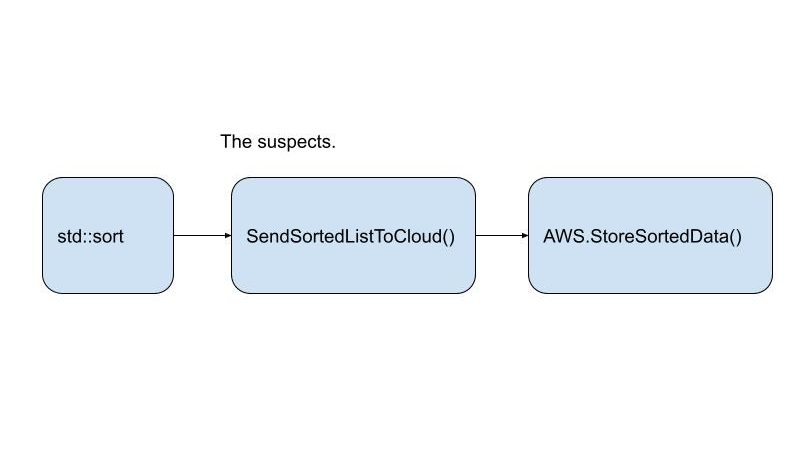
  • The C++ standard std::sort function, which must properly sort some elements for the program to behave properly.
  • The lines of code in your brand-new SendSortedListToCloud() function.
  • The AWS Cloud API StoreSortedData(), which your function sends data to.

For each suspicious function, you can assign a probability score, P(bug). P(bug) is the probability that the function contains the source of your bug. Let’s say you think it through and give the following scores:

  • std::sort: P(bug) = 0.01
    • The C++ standard functions are used by hundreds of thousands of developers every day. The code is also usually dead simple. Nothing is perfect, but the chance that you’re the first one to see a new bug in std::sort is quite small.
  • SendSortedListToCloud: P(bug) = 0.75
    • You just wrote this function, and you only have a basic unit test for the simplest behavior case. The code looks correct on manual inspection, but the clear testing gaps make it a prime suspect.
  • StoreSortedData: P(bug) = 0.10
    • Amazon is a massive company, with many developers maintaining their cloud APIs and even more developers using them. But StoreSortedData is probably doing some incredibly complex work under the hood, which is dependent on your specific AWS configuration. It would be surprising but not mind-blowing if you discovered a new bug (or ran into a known issue they haven’t fixed yet).

Congratulations! You can now zero in on the function with the highest score: that will give you your highest probability of finding the bug.

If you obtain more data, such as a whole suite of passing unit tests or line-by-line log statement verification of SendSortedListToCloud, you can always update your beliefs, potentially picking a new winner.

4b: Weigh investigations by complexity.

Let’s take another look at the example from 3a. There’s another, equally important axis you should be evaluating: complexity.

“Complexity” is a fuzzy term. It can be measured in many ways – lines of code, difficulty of an algorithm, etc. In this case, I am using “complexity of X” as a proxy for “how much time and effort will it take you to get data about X”?

Let the metric C be the expected complexity of investigating an assumption (on a 0-1 scale). Let’s try to apply this metric to the example from 3a:

  • std::sort: C = 0.3
    • There’s a lot of public information about std::sort (see this stackoverflow answer from a 2 second google search). You can also probably find the implementation being used by your code and just read it with some searching. From there you could try to add log statements, attach a debugger, write a unit test for your weird case, etc.
  • SendSortedListToCloud: C = 0.2
    • This is code that you have written and have complete control over. There’s a bit of trickiness to the code, but your workflow for editing, testing, and analyzing it is likely already in place. 
  • StoreSortedData: C = 0.8
    • The implementation is proprietary, and you have no chance of directly inspecting or testing all the code that gets executed when you call this API. Your best bet is to go through help forums or customer support, which could take a while.

All else being equal, prioritize investigating areas with lower complexity. This will allow you to get information faster. In this particular example, the difference between the highest and lowest complexity options is probably quite extreme – investigating your local code should take no more than an afternoon, while investigating the AWS code might take weeks. Checking the “easy” case first makes good sense.

There will often be situations where you simply don’t have enough information to guess which investigation will be most helpful. For example, you may know that a bug was introduced between commit 100 (last working version) and commit 200 (first version with the bug). Unfortunately you have no idea what’s in those hundred commits, and you may not have the time or expertise to manually examine each one. You have a test that can verify a particular commit, but it takes several minutes to run.

In this case, you should fall back to binary search. If all commits are equally suspicious, the most efficient thing you can do is to eliminate half of them from consideration. This means testing commit 150 – if it has the bug, the bug lies between 100-150, and you can recurse onto that range. If it doesn’t, look to 150-200 (and so on). This scales exponentially better than the most naive algorithm (testing each commit in order). In the case with 100 commits, you will find your answer roughly 10 times faster (on average).

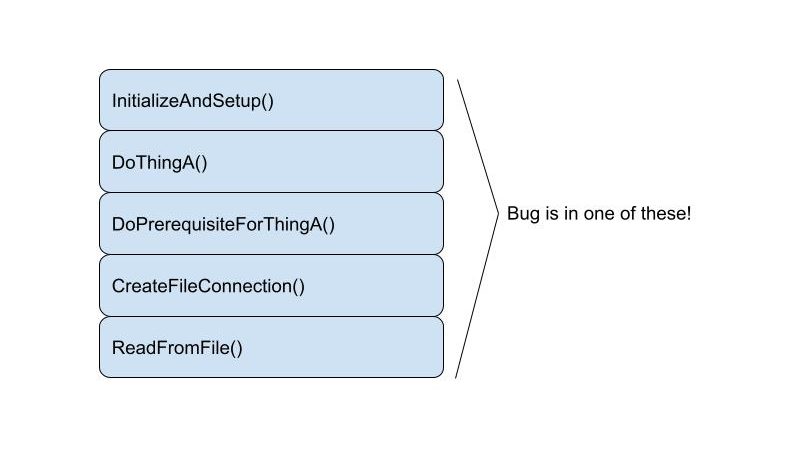
Binary search also applies in situations where the problem is not so easily mapped onto a mathematical abstraction. Imagine a case where you know there is a problem in a certain execution branch of your code with the following (rough) stack trace:

Let’s assume you have no idea where in this stack the bug happens, but you can add a check to see if it’s manifested at any given point in the program. You could drop this check at the end of any of these functions to see if the bug happened before that point.

This is another case where binary search will be the most efficient way forward. Starting with checking the middle function (DoPrerequisiteForThingA) will eliminate half the possibilities in one stroke.

You could also imagine this applying to various other scenarios: stages in a data pipeline, or a series of services that handle a particular piece of data. As a general rule of thumb, think about applying binary search when:

  1. The suspects you are investigating have some meaningful order and distinct boundaries.
  2. You have very little information about where the bug is among the suspects (they all seem equally likely).
  3. Each check is time-consuming and there are many suspects, so minimizing the number of checks matters.

4d. Any strategy is better than no strategy.

The above heuristics don’t always apply. You might not have a hunch about which area is most suspicious. It may be impossible to know ahead of time which investigation will be the most complex. The problem may not be amenable to clean slicing and dicing.

That’s ok. Strategic thinking is more important than any particular strategy. Careful readers will have already noticed that the heuristics in 4a and 4b disagree about the order of investigation in our simplified example system. Rather than following any particular rule dogmatically, think about what actually matters most in your circumstances.

Spend some time thinking about the nature of your problem space and how you might best optimize your search for a solution. 

  • What are the relevant parameters worth optimizing for? Compute resources? Engineer hours? Money?
  • Which parameter matters the most? What strategy seems to minimize it? 
  • Are there any “low hanging fruit” investigations that multiple heuristics are pointing to (easy, quick, high value)?

It’s almost always worth spending some time figuring out how to spend your time more efficiently.

5. Ask for help.

Never underestimate the power of a fresh perspective.

I strongly recommend talking to someone about your problem – whether they’re a teammate, a technical mentor, or a friend who’s willing to help. Talking to someone else can be a great way to work out the kinks in your current mental model. 

The natural human tendency is to ignore evidence that changes your mind and paper over your own leaps in logic. A good interlocutor can help identify these gaps, since they have a little more distance and objectivity. Of course, they might also have technical knowledge that you’re lacking, or a debugging strategy that you wouldn’t have thought of yourself (depending on their familiarity with the problem space).

(If you’re truly desperate, talking to a rubber duck can be better than nothing.)

Asking for help is nothing to be ashamed of. That being said, it’s important to train your own debugging mindset rather than relying on outsourcing. Make sure you can explain your chain of logic and your current strategy to yourself before trying to explain it to someone else!

6. Conclusions.

Debugging is not a mystical art. It has nothing to do with genius, level of formal education, or what prestigious company you work for. It’s not something hidden in the DNA of “10X engineers.” Expel these notions from your mind.

Debugging skill comes from the calm, logical application of a few common sense principles. Like any skill, it can be improved with regular practice. Over time, you can turn these principles into mental habits that you’ll reach for without thinking.

Direct experience is always the best teacher – so go code until you hit some bugs. It usually doesn’t take long.